
Adding or changing a card or bank account
How to put new details in, and why we never hold them.
Go to Account, click Change how you pay, then pick either Bank transfer or Card. A secure form opens on the page.
That form belongs to the company that handles our payments, not to us. What you type into it goes straight to them. It does not pass through KJONGSys and it is never stored on our server. All we are ever told is the last four digits and the expiry date, which is what you see on your account page.
When you would do this
- Your card was reissued and the number changed.
- Your card is about to expire.
- You have changed bank.
- You want to move from card to bank transfer, or back the other way.
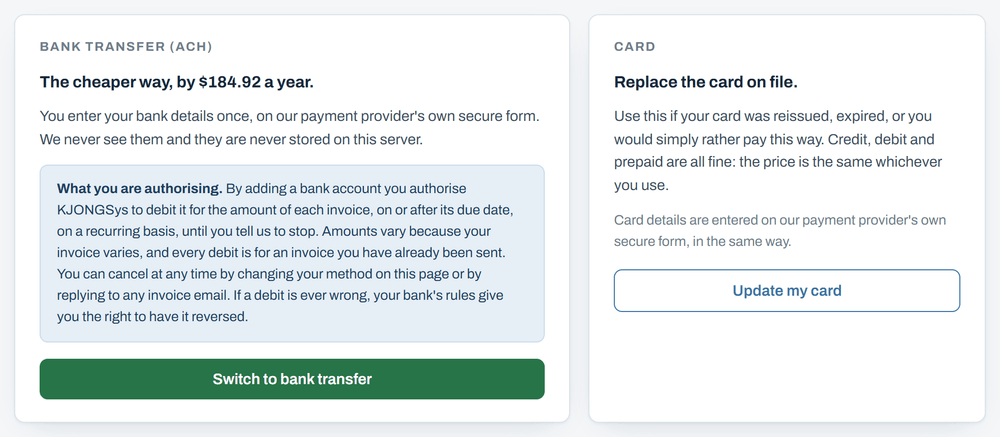
Adding a bank account
Adding a bank account lets us take the amount of each invoice out of it, on the day that invoice is issued, until you tell us to stop. The amount varies because your invoice varies, and every one of them is for an invoice we have already sent you. Stop it whenever you like by changing how you pay on that same page, or by replying to any invoice email.
If the form does not open
Now and then it does not, usually because a browser add on or an office network is blocking it. The page will say so. Nothing has been changed and nothing you typed was kept. Try a different browser, or reply to any invoice email and we will do it for you.
The rest of it
- Signing inYour user ID, a password if you want one, and the emailed link that lasts 15 minutes.
- Seeing what you oweWhere the amount due is, and what each line on an invoice means.
- Choosing how you payCard or bank transfer, what each one costs you, and what changes if you switch.
- When you are chargedThe day the money moves, and what happens if a payment does not go through.
- Getting helpReply to any invoice email, or call 989-273-2839.