
Signing in
Your user ID, a password if you want one, and the emailed link that lasts 15 minutes.
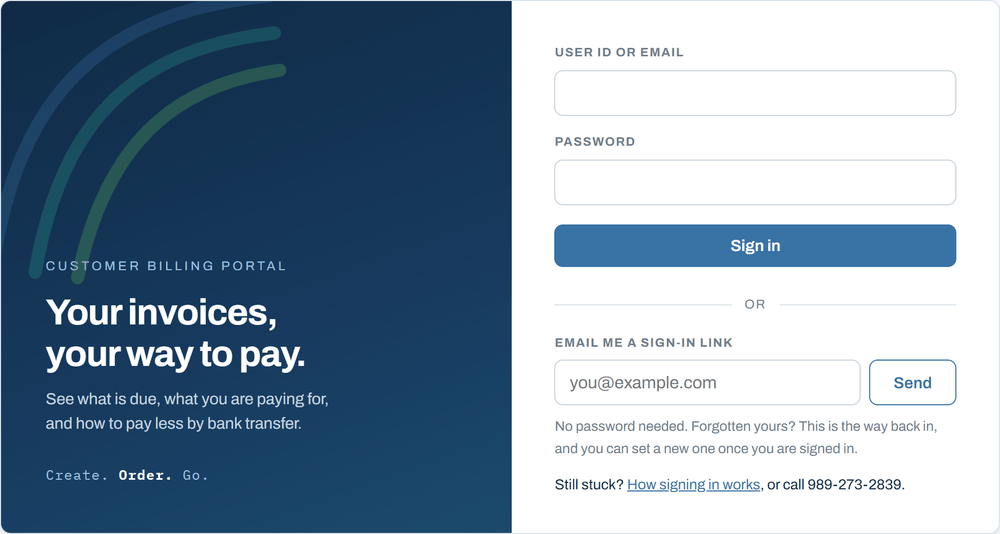
You need two things to get in: who you are, and one way of proving it. Who you are is your user ID or the email address we send your invoices to. Either one works.
If you have a password
- Go to billing.kjongsys.com.
- Type your user ID or your email address in the first box.
- Type your password in the second box.
- Press Sign in.
If you do not have a password, or you have forgotten it
Use the lower half of the same page, under the word or. Put your email address in and press Send. A link arrives within a minute. Click it and you are in. There is nothing to remember and nothing to type.
Setting a password
You do not have to. The emailed link works every time and plenty of people never set one. If you would rather have a password, sign in first, then click Password along the top. It has to be at least 10 characters. A short phrase you will remember beats a short scramble you will not.
If you leave the portal open and untouched for half an hour it signs you out on its own. Sign in again the same way you did the first time.
The rest of it
- Seeing what you oweWhere the amount due is, and what each line on an invoice means.
- Choosing how you payCard or bank transfer, what each one costs you, and what changes if you switch.
- Adding or changing a card or bank accountHow to put new details in, and why we never hold them.
- When you are chargedThe day the money moves, and what happens if a payment does not go through.
- Getting helpReply to any invoice email, or call 989-273-2839.