
Choosing how you pay
Card or bank transfer, what each one costs you, and what changes if you switch.
There are two ways to pay automatically: by card, or by bank transfer, which your bank may call ACH. You can move between them yourself. Go to Account and click Change how you pay.
The change takes effect on your next invoice. Nothing else moves: same services, same dates, same terms.
What the difference costs
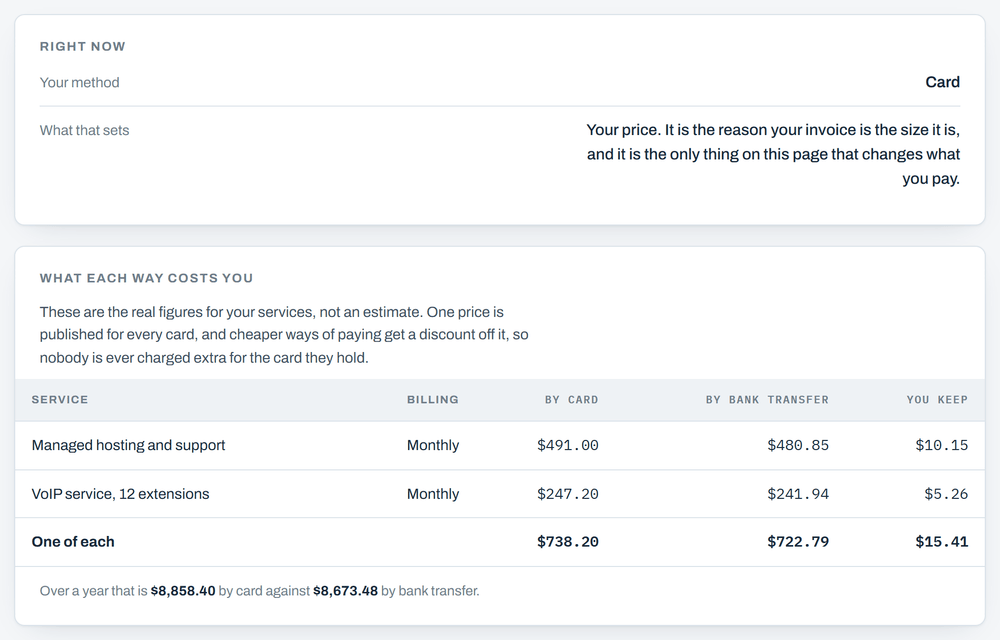
Every service has one published price, and that price already covers the cost of taking a card. Pay a cheaper way and a discount comes off. Nobody is ever charged extra for the card they happen to hold, and credit, debit and prepaid all cost you exactly the same.
Taking a card costs 2.79% of the invoice plus 30 cents. Taking a bank transfer costs 0.8%, and it stops at a flat $5.00 however large the invoice is. That cap is the whole story. Above about $625 an invoice the bank transfer cost stops rising while the card cost keeps climbing, so the bigger your invoice, the bigger the gap.
Two real examples
- An invoice of about $15: $15.74 by card against $15.12 by bank transfer. You keep 62 cents an invoice, which is $7.44 a year. Real, but small.
- An invoice of about $700: $719.99 by card against $704.60 by bank transfer. You keep $15.39 an invoice, which is $184.68 a year. On an account that size it is worth the ten minutes.
Your own numbers are on the How you pay page, service by service, worked out from what you actually pay rather than from an average. They are not estimates, and they will match your invoice to the cent.
If you pay by check
A check costs us nothing to process, so it is already the cheapest way for you and there is no processing cost built into your price. Moving to bank transfer would cost you money rather than save it. Carry on exactly as you are.
What changes when you switch
- Your next invoice shows the new amount.
- Invoices already sent stay exactly as they were sent.
- Your services, your dates and your payment terms do not change at all.
Would rather not do this online? Reply to any invoice email, or call 989-273-2839, and we will switch you over by hand.
The rest of it
- Signing inYour user ID, a password if you want one, and the emailed link that lasts 15 minutes.
- Seeing what you oweWhere the amount due is, and what each line on an invoice means.
- Adding or changing a card or bank accountHow to put new details in, and why we never hold them.
- When you are chargedThe day the money moves, and what happens if a payment does not go through.
- Getting helpReply to any invoice email, or call 989-273-2839.